
Your monitoring tools and guardrails detect what happens at runtime, such as data drift, performance deviations or security incidents. Send those events to Saidot to link them to the systems and models in your inventory and trigger the required governance actions: for example creating a review, raising a risk level or notifying the owner.
From your tools to Saidot
The observability integration identifies the monitoring tool sending the event. The event is then described by its type, its severity and the observability IDs of the systems or models it concerns. The event is linked to the system, model, agent or dataset carrying the matching observability ID. Finally, the Event-driven governance actions Workflow of the space runs the actions switched on for that event type and severity.
Set up the connection as follows: create the observability integration, map your systems and models, and switch on the event types in the Workflow. Events sent before the Workflow is set up are recorded but do not trigger any action.
Step 1. Create the observability integration
Only Admins can create observability integrations.
-
In the Admin settings, open the Organisation page and go to Observability integrations.
-
Select Create integration.
-
Enter a name and the platform. Give your integration a clear and understandable name so events read through the Saidot APIs and the Governance MCP show where they come from.
-
Share the integration ID with the team that configures the monitoring tool. The tool sends it with its events, together with an API token or a service account token.
An Admin can deactivate an integration when its monitoring tool is retired. Events sent through a deactivated integration are rejected.
Step 2. Map your systems and models
An event is linked to a system, model, agent or dataset through its observability ID: the name your monitoring tool uses for it. The observability ID is separate from the record's Saidot ID, and cannot be entered in the user interface.
Record the observability ID in one of these ways:
-
When a pipeline registers or updates the record through the Saidot APIs, in the
externalObservabilityIdfield of systems, models, agents and datasets. -
On an existing record, by an Admin, with
PUT /api/v1/observability/entity-mappings/{entityType}/{entityId}.
Tips for the mapping:
-
Use the name in your monitoring tool, such as the service name in your dashboards, so the monitoring team doesn't need to maintain a second list.
-
Map before you send. An event with an observability ID that isn't recorded on any record is recorded but not linked, and does not trigger any action.
-
One event is linked to one record. An event can list up to 20 observability IDs, but it is linked to only one record: a system first, then a model, an agent or a dataset. If you send a model's ID with the ID of the system that uses it, the event is linked to the system.
-
Keep each observability ID unique. An ID recorded on two records of the same type makes the event fail as ambiguous.
Step 3. Switch on event-driven governance actions
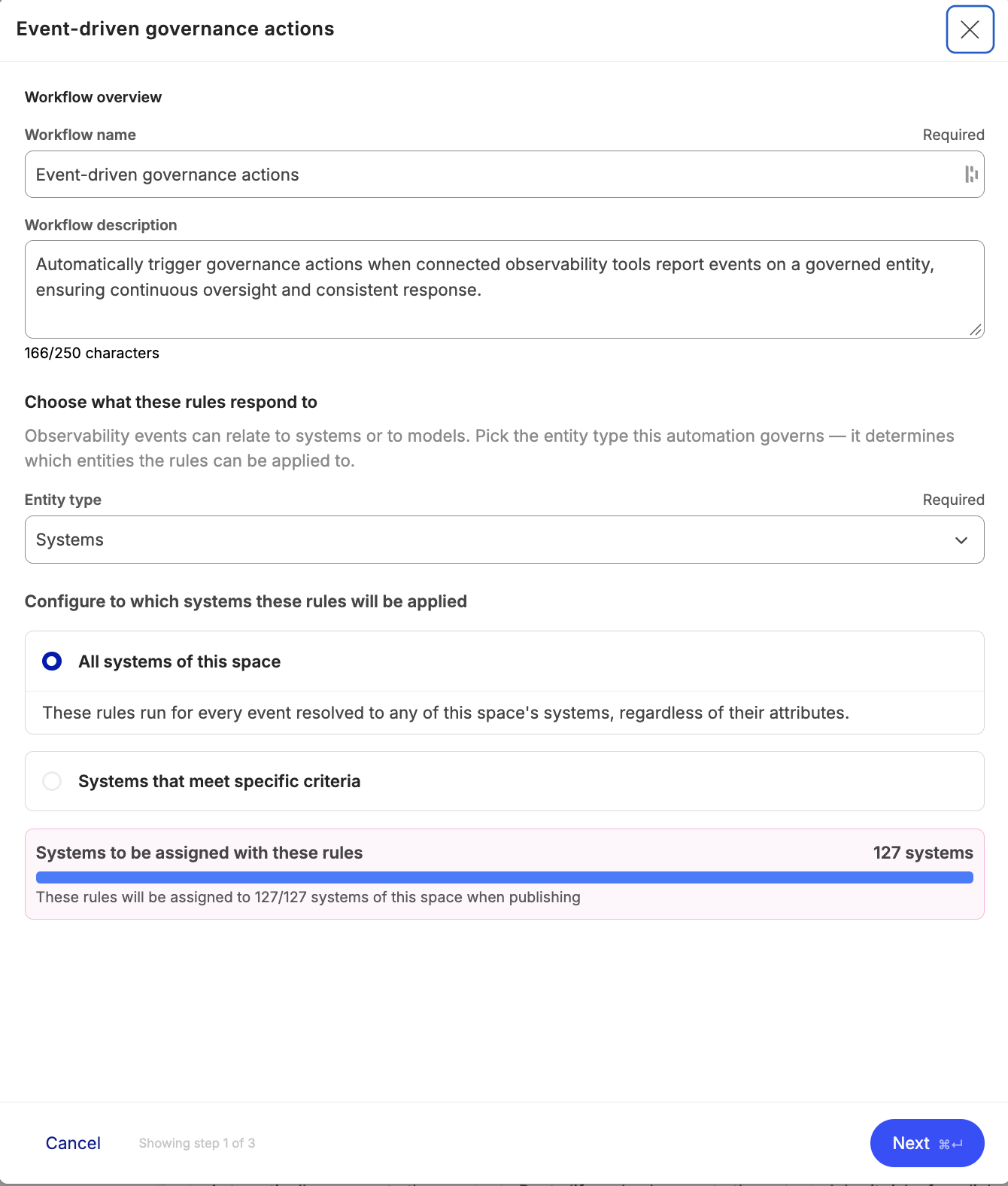
The Event-driven governance actions Workflow, on the Workflows page of each space, sets what happens when an event is received in that space. As Workflows are set up per space, each space can have its own triggers and related actions.
-
Choose the rule criteria. Select the asset type the rules apply to (systems, models, agents or datasets) and, if needed, criteria on the asset's fields with AND/OR rules. The actions only affect matching assets.
-
Choose the event types. Check that the event you switch on matches by name the code the monitoring tool sends. If an event type's toggle is off, its events are recorded but trigger no action.
-
Choose the actions and their severity. For each action, choose the minimum severity: the action runs only for events of that severity or higher.
-
Review and save the rules. Check that the Workflow is listed under your active Workflows. You can pause, edit or delete the Workflow from the menu next to it.
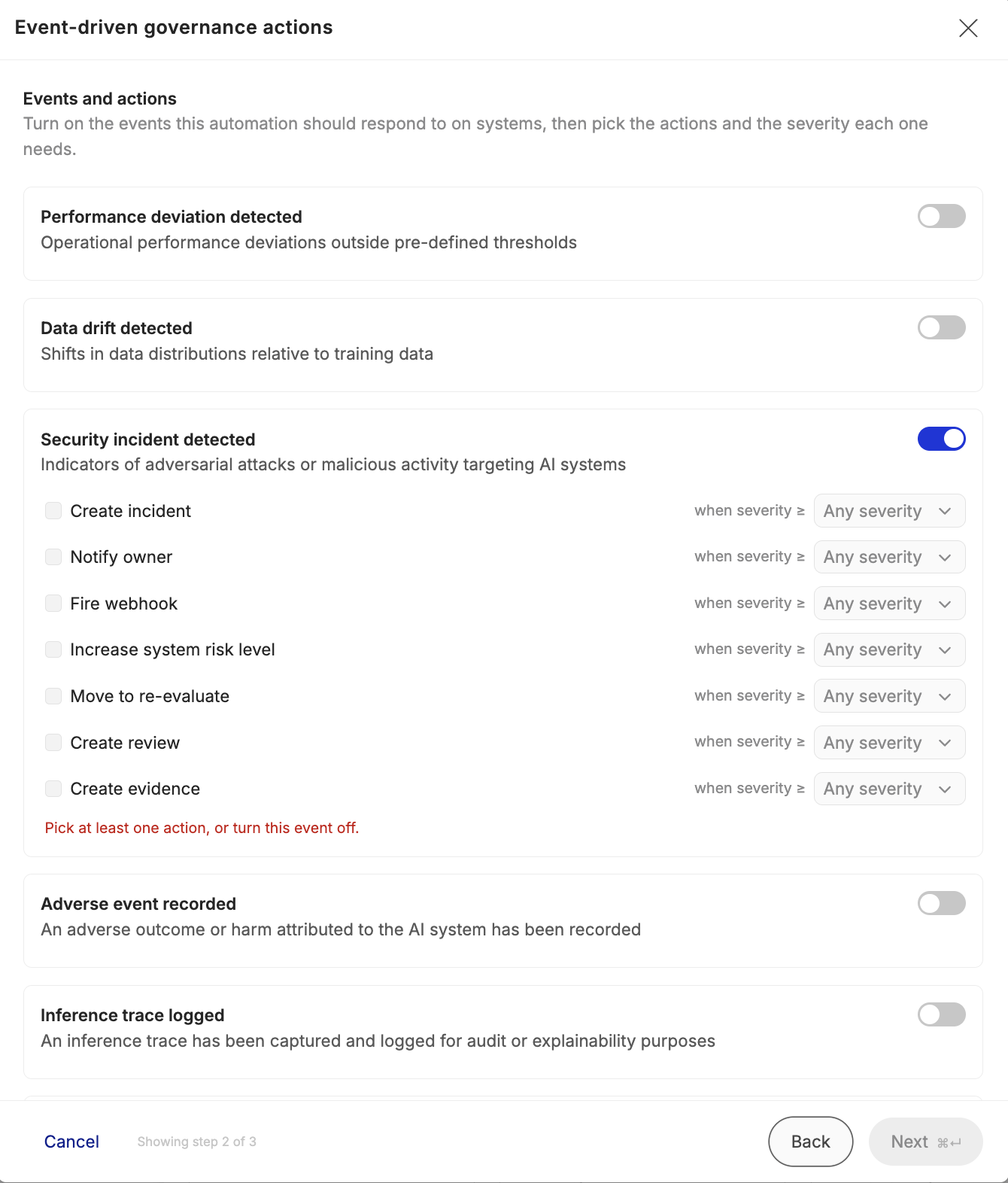
Available actions:
|
Action |
What it does |
|---|---|
|
Notify owner |
Notifies the owners of the system, the owner of the model, or the owner of the agent and the owners of its linked systems |
|
Create review |
Creates a review on the system, which refers to the event that triggered it |
|
Increase system, model, agent or dataset risk level |
One action per asset type. Raises the risk level of the linked asset by one level |
|
Move to re-evaluate |
Moves the system to the re-evaluation lifecycle stage, unless re-evaluation is gated in the space |
|
Create incident |
Records an incident on the system |
|
Fire webhook |
Sends the event to the webhook endpoints of the space, for events linked to a system. See Webhooks |
Typically, organisations set “notifying the owner” as an action run at any severity, while raising the risk level or moving the system to re-evaluation might run only from high severity.
Test a new event type on one system before the monitoring tool sends events about all systems.
Step 4. Send events
The monitoring tool sends one event per request to POST /api/v1/observability/events, with the integration ID in the x-integration-id header and an API token or service account token as a bearer token.
-
Event type and title are required. An event type code that Saidot doesn't recognise is recorded but does not trigger any action.
-
Severity ranges from
INFOtoCRITICAL. -
Event ID makes the request idempotent: if the tool sends the same event ID twice, it is only recorded once.
-
Entity IDs list the observability IDs of the records the event concerns.
-
Links point to the dashboard or alert where people can investigate.
The full request format is in the Saidot API documentation at app.saidot.ai/api.
Follow the result
-
Processing: an event is received and processed usually within a second.
GET /api/v1/observability/events/{id}returns the event with itsresolutionStatus, which says whether the event was linked and to which type of record, or why not. -
On the record: a review created by the event refers to the event. A raised risk level is recorded as an escalation, with the event as its reason.
-
For the owner: the owner receives the notification, checks what changed and completes the review.
-
History: events stay in Saidot after the record they concern is deleted. Read them with
GET /api/v1/observability/events, or with the Governance MCP toolslist_observability_eventsandget_observability_event. The Audit log records only that an event was sent, not the record it was linked to.