
This page explains the Saidot data model: what entities exist, how they relate to each other, and how governance flows through the graph. It is the recommended starting point before working with the Saidot API or any MCP server tool.
Core entities
Saidot organises governance around a set of connected entity types. Understanding what each one represents — and how they relate — is essential for building reliable integrations.
Systems
A System is the primary governance unit in Saidot. It represents an AI-based product or use case that your organisation has deployed or is developing. Everything else in Saidot — risks, controls, policies, models — can be linked to a System. Systems are the entities you register, classify, assign owners to, and generate transparency reports for.
Models
A Model is a machine learning model or foundation model used by one or more Systems. Models are catalogued independently so that governance (risk data, approval status, provider information) can be applied once at the model level and inherited by all Systems that use the model.
Agents
An Agent is an autonomous AI component — such as a tool-using LLM agent or a multi-step automated pipeline — that acts on behalf of users or systems. Agents are catalogued alongside models and can be linked to Systems.
Datasets
A Dataset represents data used by a System or Model — for training, fine-tuning, retrieval, or runtime input. Datasets are linked to Systems and can carry data governance metadata including sensitivity classification, retention, and provenance.
Risks
A Risk is a documented potential harm or failure mode associated with a System. Each risk has a description, likelihood, impact, treatment plan, and owner. Risks can be inherited from linked Models, Agents, and Datasets (see Risk inheritance below), or added manually.
Controls
A Control is a mitigation measure linked to one or more Risks on a System. Controls have an implementation status, owner, review schedule, and can carry evidence. Controls can be sourced from the Saidot Library (curated templates) or created from scratch.
Policies
A Policy is a regulatory or organisational requirement that applies to one or more Systems. Policies contain structured requirements that map to controls and can drive compliance tracking and gap analysis.
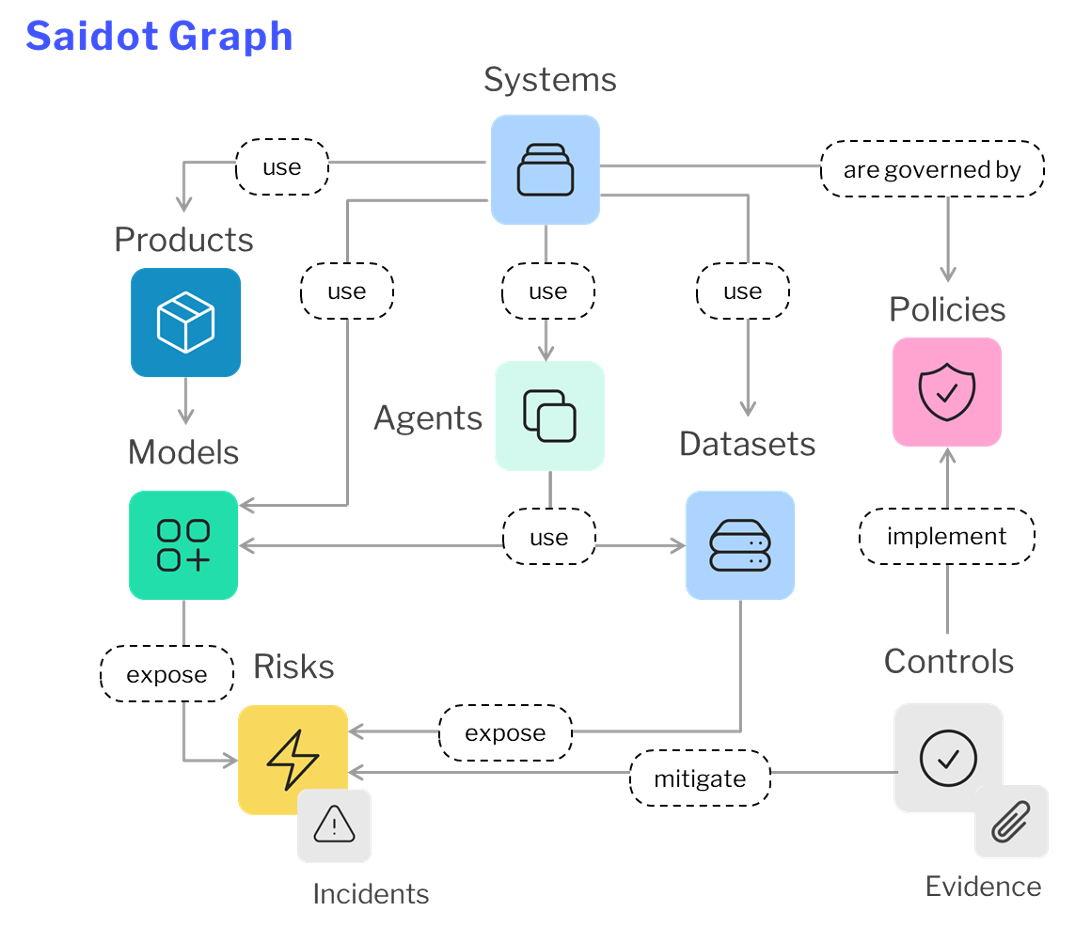
How entities relate: the governance graph
Saidot's entities are connected in a directed graph. The primary relationships are:
-
A System uses one or more Models, Agents, and Datasets
-
A System has Risks — either inherited from its linked assets or added directly
-
A Risk is mitigated by one or more Controls
-
A Control can be linked to one or more Policies (via policy requirements)
-
Models and Agents can carry their own Risks and Controls which propagate up to linked Systems
This graph structure enables Saidot's key capability: risk inheritance. When you link a Model or Dataset to a System, the risks already documented on that asset are automatically surfaced on the System. Governance effort invested once at the asset level benefits every System that uses it.
The two-store model: Library vs. Governance
Understanding the difference between the Library and your Governance data is essential for agents and integrations. Confusing the two stores is the most common source of errors in API and MCP-based workflows.
Saidot has two distinct data stores:
The Library
The Library is Saidot's curated, read-only knowledge base. It contains:
-
Template risks (common AI risks with descriptions, likelihood ratings, and suggested controls)
-
Template controls (mitigation measures with implementation guidance)
-
Policies and regulatory frameworks (EU AI Act, ISO 42001, NIST AI RMF, and others)
-
Foundation model cards and AI product profiles
The Library is the same for all Saidot customers. You cannot write to it. Use Library content as a starting point — import risks and controls from the Library into your Governance space to apply them to your systems.
Use the Library MCP Server to browse and search Library content.
Your Governance data
Your Governance space is your organisation's own read/write data. It contains the systems, risks, controls, policies, models, agents, and datasets your team has registered and configured. This is where all writes go — registering a system, adding a risk, updating a control's status, assigning an owner.
Use the Governance MCP Server to read and write your organisation's governance data.
Practical rule for agents
When an agent needs to look something up (e.g. "what risks exist for facial recognition systems?"), it reads from the Library. When an agent needs to act on your data (e.g. "add this risk to System X"), it reads and writes to your Governance space. Never attempt to write to the Library — those calls will be rejected.
Risk inheritance
Risk inheritance is what makes Saidot scalable for large AI portfolios. When you link a Model or Dataset to a System, Saidot automatically surfaces the risks already documented on that asset at the System level. This means:
-
Risks documented on a foundation model are immediately visible on every System that uses it
-
Provider-level mitigations applied at the Model level reduce the inherited risk count on all linked Systems
-
A single update to a shared asset propagates governance changes across the portfolio
Inherited risks are distinct from directly-added risks in the UI and API. The source of each risk indicates whether it is inherited or added directly.
The governance lifecycle
Saidot structures governance work around a lifecycle with the following stages: Design, Development, Validation, Deployment, Monitoring, and Decommission. Systems move through these stages, and governance tasks — risk assessments, control reviews, policy checks — are associated with specific lifecycle stages.
When working via API or MCP, the current lifecycle stage of a System is a key field. Many governance actions (e.g. triggering a new risk assessment, requesting a review) are semantically tied to stage transitions. Valid lifecycle stage values are available via the Governance MCP Server.
Next steps
-
See Getting started with Saidot to learn how to use these entities through the UI
-
See Governance workflows by role for role-based patterns using the API and MCP
-
See Connecting AI tools to Saidot for setup instructions for Claude, VS Code, and custom agents